Customer Notice
A customer notice allows you to define some extra content to display to the customer while collecting payment details via a Hosted payment page. This can be used to convey additional information such as advisory or instructional text, compliance notices and so on.
Content may be varied on a per-session basis, and supports a limited subset of HTML.
Defining a customer notice
Include a customerNotice as part of the Hosted session initialisation request (see Hosted payments API):
Supported HTML
Content may include the following HTML elements: <p>, <br>, <em>, <strong>, <ul>, <ol>, <li>, <div> and <span>.
In addition, <div> and <span> elements may include a class attribute to enable targeted selection with CSS.
Malformed or unsupported HTML will be rejected with an error.
Display locations
- FORM_TOP: Displays the notice above the form
- FORM_BOTTOM: Displays the notice below the form
- FORM_AFTER: Displays the notice after all form components — including the submit/cancel buttons — but above the footer
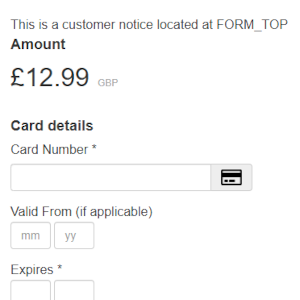
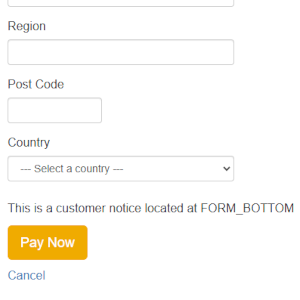
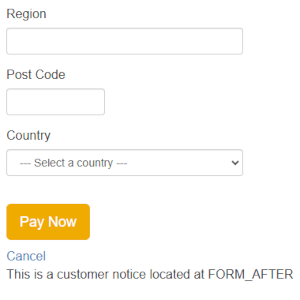
Example
Payment session with a customer notice
POST /hosted/rest/sessions/{instId}/payments{
"session": {
"returnUrl": {
"url": "https://www.example.com/return"
}
},
"transaction": {
"money": {
"currency": "GBP",
"amount": {
"fixed": 12.99
}
},
"merchantReference": "SESS-CN-0001"
},
"customerNotice": {
"content": "This is a customer notice located at FORM_TOP",
"locator": "FORM_TOP"
}
}curl -X POST "{targetEnvironmentPath}/hosted/rest/sessions/{instId}/payments" \
-u "{apiUser}:{apiPassword}" \
-H "Content-Type: application/json" \
-d '{
"session": {
"returnUrl": {
"url": "https://www.example.com/return"
}
},
"transaction": {
"money": {
"currency": "GBP",
"amount": {
"fixed": 12.99
}
},
"merchantReference": "SESS-CN-0001"
},
"customerNotice": {
"content": "This is a customer notice located at FORM_TOP",
"locator": "FORM_TOP"
}
}'HTTP/1.1 201 Created
{
"sessionId": "SMjqWah3dc1VF17zWbcLcKsO_",
"redirectUrl": "https://secure.mite.pay360.com/hosted/SMjqWah3dc1VF17zWbcLcKsO_/begin/SMjqWah3dc1VF17zWbcLcKsO_",
"status": "SUCCESS"
}Styling with CSS
You can use a custom skin to style the customer notice and/or its content. To support this, we provide the following CSS classes:
customer-notice: This class can be used to style the notice regardless of its position on the pagecustomer-notice-form-(top|after|bottom): Use these specific classes to style the notice based on its positioncustomer-notice-form-top: Styles the notice when it appears at the top of the formcustomer-notice-form-after: Styles the notice when it appears after the form but above the footercustomer-notice-form-bottom: Styles the notice when it appears at the bottom of the form
For instance:
<div class="customer-notice customer-notice-form-top">
 This is a customer notice located at FORM_TOP
</div>
Refer to Skin CSS for more information, including an overview showing how the customer notice is included relative to other key elements of the page.