3D Secure
3D Secure (alternatively, 3-D Secure/3-Domain Secure) is an additional authentication process for e-commerce transactions which aims to prevent fraudulent use of payment cards online. Most major card schemes implement a brand of 3D Secure.
Authentication occurs prior to authorisation, and if successful, results are passed on to the acquirer and card scheme. These include evidence of the authentication outcome, which can be used to defend against certain types of chargeback on eligible card types. This provides liability shift for merchants, who might otherwise lose funds despite acting in good faith.
3D Secure was first introduced (as 3DSv1) in 2001, usually consisting of a password or simple credential provided by the cardholder to their issuer’s Access Control Server (ACS). This provided some verification, but did not usually facilitate any significant risk analysis, nor allow for more sophisticated authentication approaches. 3DSv1 was decommissioned in late 2022.
3D Secure 2 (3DSv2, also known as EMV 3DS) is the current version of the process, and provides increased security while also aiming to allow for a frictionless payer journey wherever possible. Issuers can now access a broader range of information about the transaction (including some provided by the merchant), and the cardholder’s device, allowing for more sophisticated risk analysis. Where additional authentication is required, a challenge can be invoked, which provides Strong Customer Authentication (SCA). SCA challenges incorporate multi-factor authentication (MFA) and allow cardholders a greater variety of ways to verify their identity, including the use of mobile devices and mobile banking apps. SCA is required to accept cards online in several territories, including the UK, EU and EEA.
Advanced Payments supports 3DSv2 for Visa Secure, Mastercard Identity Check and American Express SafeKey.
As part of processing with 3DSv2, issuers perform Transaction Risk Analysis (TRA) which enables a real-time risk assessment of the transaction that determines whether to further authenticate the cardholder (using one or more challenges), accept the transaction (frictionless authentication) or reject it. Issuers can use a wider range of authentication methods, including multi-factor authentication (MFA), to verify the cardholder.
Access PaySuite supports 3D Secure 2.2, and our implementation aims to simplify the integration as far as possible for merchants by handling some of the complexities that 3DSv2 introduces. We can also pass through additional information into the authentication process to supplement the issuer’s risk analysis.
Transaction flow
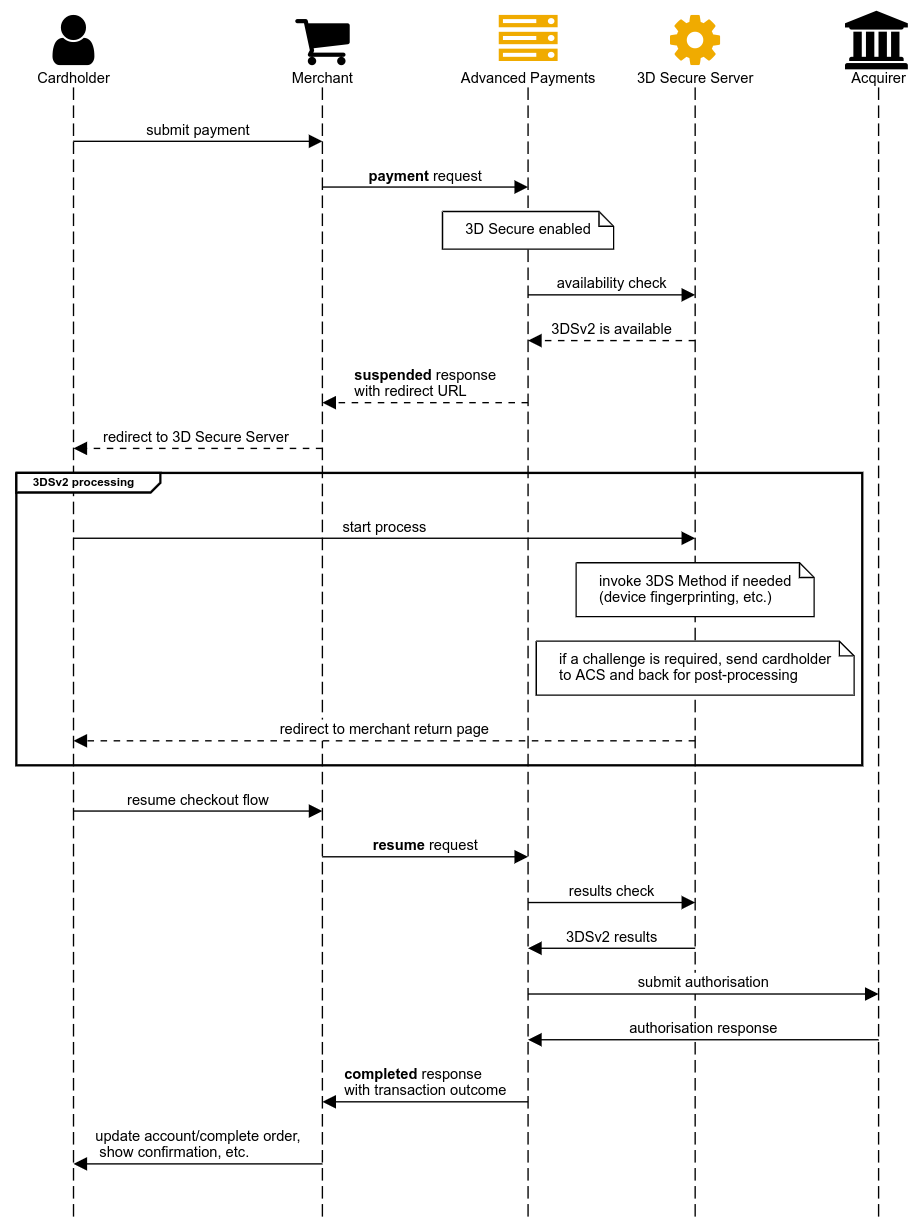
When processing an eligible transaction with 3DSv2 enabled, we perform an availability check to determine whether the payment card is enabled for it.
If 3DSv2 is available, then the cardholder needs to be redirected to our 3D Secure Server. For merchants using their payment page, we will suspend the transaction and return an intermediate response which contains information on how to redirect the cardholder — see Integration details below for what this looks like and how to deal with it.
Our 3D Secure Server will obtain additional required information from the cardholder’s browser in order to proceed with the authentication process. 3DSv2 includes the concept of a “3DS Method”, which is an opportunity for the issuer’s Access Control Server (ACS) to briefly interact with the cardholder’s device (without directly engaging the cardholder) to gather information to supplement their risk analysis; for example, by calculating a device fingerprint or similar metrics. If the card issuer has specified that this should happen, then our 3D Secure Server will invoke this process on your behalf.
Once any additional information has been gathered, we request authentication, providing all the necessary data about the transaction. If the issuer responds with a successful or failed authentication (frictionless) or a rejection, then the cardholder will be returned to the merchant to resume processing.
If the issuer determines that additional authentication is required (challenge) then the 3D Secure Server will forward the cardholder to the ACS to complete that process, and receive them back when authentication is completed. It will then return them to the merchant to resume processing.
To complete the transaction, merchants using Your Payment Page need to send a resume request. The authentication results are automatically fetched from the 3D Secure Server — there is no requirement to pass additional data at this point. We will examine the authentication results, calculate any liability shift obtained, and apply any risk controls or other rules in place to determine whether to proceed with authorisation. Transactions which fail authentication will never proceed to authorisation, which is in line with card scheme rules. Either way, we will return a final response with the outcome.
When using the PaySuite Payment page, we automatically handle redirecting the cardholder to the 3D Secure Server, as well as receiving them back and resuming the transaction.
We will try and use 3DSv2.2 whenever possible. If it is not available for a given transaction (e.g. because the card issuer doesn’t support it yet) then we will use 2.1 if we can. Otherwise, we may proceed without 3D Secure.
If 3D Secure is not available, then depending upon the account configuration, risk controls, and any rules set up, we may or may not proceed to attempt an authorisation without it. This authorisation may fail (with a soft decline) if the issuer is unwilling to approve without authentication.
Using 3DSv2
Additional request data
A cardholder name of at least two characters is required for 3DSv2 processing. If this is not part of the payment details provided, we will use the customer name if there is one.
When initiating a recurring or instalment sequence, additional information about the agreement is required, this is provided in the continuousAuthorityAgreement section of the request, see how to do that when using the PaySuite payment page and when using your payment page.
If required information is not provided, 3DSv2 is not available for the transaction — it may or may not proceed without it, as described above. The versionsAttempted response element can be used to identify when incomplete data has prevented the use of 3DSv2.
Visa also mandate — and Mastercard strongly recommend — providing the customer’s email address, telephone number, or both. For telephone number, include the international dialling code, e.g. +441234567890. When using the PaySuite Payment Page, these fields can be added to the payment form; see Skin properties.
You can provide additional information into the authentication process, which can increase the likelihood of a frictionless outcome:
- billing and shipping address
- in order to be useful for 3D Secure, at least line1, city, postcode and countryCode are needed
- we will automatically omit incomplete addresses to avoid impacting authentication
- merchant risk indicators and information about their history with the customer
Strong Customer Authentication tuning
Beyond the additional request data, you can pass supplementary information about the transaction, the customer, and their relationship with you into the authentication process. An issuer may use it in their risk analysis, and in some cases it will influence whether they issue a challenge — although the decision remains theirs, and some scenarios always require one under card scheme rules or applicable legislation.
This data goes in the strongCustomerAuthentication element of the request, available both when using your own payment page and when creating a PaySuite payment page session. Every field in it is optional, and it holds:
- transactionType — a detailed classification of the transaction, where GOODS_OR_SERVICES is not right for your business model; consult your acquirer if you are unsure
- challengeRequested — your preference for a challenge: that one not be performed, that one is preferred or necessary, or none stated. We may override it, as described in Challenge vs. frictionless
- merchantRisk — what is being bought and how it reaches the customer: delivery timeframe and email address, pre-orders and re-orders, gift card purchases, and the type of shipping address
- accountInfo — the customer’s history with you: when their account was opened, last changed, and their password last changed, how long the card and shipping address have been on the account, how much activity there has been in the last day, six months and year, and whether you have seen suspicious activity
- authenticationInfo — how and when you authenticated the customer yourself before the payment
- priorAuthenticationInfo — the reference, method and time of a previous 3DSv2 authentication for this cardholder
A shipping address may be provided as well, where one applies — see Shipping address and order details. The full field list is in the request schema for the payment and hosted session endpoints, and what we received back is echoed in strongCustomerAuthentication in the response.
For a request carrying it, see 3D Secure payments when using your own payment page, or 3D Secure payments when using ours.
Challenge vs. frictionless
Access PaySuite will automatically request or attempt to mandate a challenge in scenarios where explicit Strong Customer Authentication (SCA) is required, in line with card scheme rules. For example, a challenge is usually required when storing a card for future re-use, and/or setting up a new recurring or instalment sequence. In these cases, we will override any preference expressed by the merchant. This aims to avoid unnecessary declines and subsequent re-tries in these situations.
The issuer Access Control Server (ACS) has the final decision as to whether or not a challenge occurs, and it may therefore issue a challenge where the preference was to have none, or indeed, omit a challenge where one was indicated.
Within API responses:
- strongCustomerAuthentication.challengeRequested echoes the merchant’s original preference, if one was supplied
- threeDSecure.challengeRequest indicates what we ultimately requested from the ACS
- threeDSecure.frictionless indicates whether a challenge actually occurred — for a completed transaction, if this is false, then a challenge took place; otherwise, there was none
Stored Credentials Framework has more information about how we determine when cards are being stored or re-used.
Cardholder information
An issuer may wish to provide additional information to the cardholder on frictionless transactions. For example, if the transaction was rejected or not authenticated, the cardholder may need to contact their issuer or take some other action in order to allow it to proceed in future. Alternatively, the issuer may permit the transaction, but require some action in order to improve the security of future transactions.
When this happens, a short message will be returned as part of the authentication process, e.g:
Access PaySuite will display the message to the cardholder if:
- you are using the PaySuite Payment Page, and the transaction result page is active — the message will be shown on the result page before the cardholder is returned to you
- you are using Pay by Link — the message will be shown to the cardholder at the end of the transaction process
Merchants using their own payment page, as well as PaySuite Payment Page merchants not using our result page, are responsible for displaying the message to the cardholder. The value is returned in the cardHolderMessage element in API responses and is also present in “retrieve transaction” responses, notifications and callback requests.
3DSv2.2 mandates that, when present, the message must be conveyed to the cardholder. A message may also be returned for 2.1. Where Access PaySuite is able to display the message, we do not differentiate based on version, and we recommend merchants adopt the same approach when it is their responsibility.
Soft declines
During authorisation, if Strong Customer Authentication (SCA) has not been performed, a card issuer may choose (or be required) to “soft decline” the transaction. This means that the issuer might have approved the transaction if SCA were performed, but won’t approve without it.
Where supported by the acquirer and our acquiring route, we can recognise this type of decline, and will use a dedicated reason code in the response — D101. Other declines, or soft declines we can’t recognise, will continue to receive a D100 reason code.
Integration details
When using your payment page
When processing with 3DSv2 there will be an initial check to see if the transaction will be able to use it, as described above. If 3DSv2 is available then the transaction will be suspended: the outcome is U100, the transaction sits at stage THREE_D_SECURE, and the response carries a clientRedirect section instead of an authorisation — see 3D Secure payments for what that looks like.
For the suspended transaction to continue, the cardholder needs to be redirected to the Access PaySuite 3D Secure Server.
The cardholder’s browser should be POSTed to the url given in the clientRedirect section of the API response, with request fields in application/x-www-form-urlencoded format. This is usually done by rendering a hidden HTML form and triggering its submission with JavaScript. For example:
<form action="${clientRedirect.url}" method="POST">
  <input name="transactionId" value="${clientRedirect.threeDSServerTransId}">
  <input name="notificationUrl" value="https://merchant.example.com/payment/3ds-return">
  <input name="MD" value="some merchant data">
</form>
This contains the following elements:
| transactionId | The UUID uniquely identifying this transaction to the 3DS Server. Should be sent as-is. This field is mandatory so it must be supplied. |
|---|---|
| notificationUrl | URL (hosted by the merchant) to which the cardholder is returned after 3D Secure processing; see below. This must be a well-formed URL. For testing, you may use a local network address, including reserved address space, and you may use plain HTTP. In live, you need to use a value that the cardholder’s browser can access — usually, an address resolvable using public DNS — and must use HTTPS. This field is mandatory so it must be supplied. |
| MD | Merchant-defined data which will be returned with the cardholder when they are redirected by the 3D Secure Server. You may use this field to store any information you need to resume the transaction, such as a session or checkout identifier, or the Advanced Payments transaction ID. Do not include sensitive data. This field must contain only ASCII characters in the printable range (i.e. 0x20 to 0x7E), but you may apply Base64 encoding if needed. The size of this field (after any encoding) is limited to 1024 bytes. This field is mandatory so it must be supplied. |
Once the cardholder completes authentication, they will be POSTed back (in the same format) to the notificationUrl given, along with the following fields:
| transactionId | The UUID uniquely identifying this transaction to the 3DS Server. |
|---|---|
| MD | Merchant-defined data, as originally included when the cardholder was redirected. |
| overallStatus | Status of the 3D Secure handover only; this indicates if there were any issues with the redirect request, or during the authentication process, but does not provide a final outcome for the transaction — a resume request is required in order to complete. Some values indicate a possible issue with your integration. |
| overallStatus | Meaning |
|---|---|
00 | Handover complete; authentication result is available |
01 | Handover failed; request contains an unknown or invalid transactionId Check your integration is using the correct value from the response |
02 | Handover failed; request contains an invalid data element (i.e. notificationUrl or MD) Check your integration meets the requirements described above |
03 | Handover complete; authentication result not received yet The Access PaySuite 3D Secure Server has not received a final outcome from the scheme; this is unlikely but possible; you should still resume the transaction, but it may result in a temporary failure — contact us if this persists |
04 | Handover failed; the transaction is being/has already been processed. Resuming the transaction may or may not succeed, depending upon the cause Check that your integration isn’t accidentally redirecting the cardholder twice |
99 | Handover failed; indeterminate error. Resuming the transaction may or may not succeed, depending upon the cause Contact Access PaySuite support to investigate this failure, especially if it persists |
When the cardholder is returned to the notificationUrl provided, a resume request is required in order to complete the transaction, regardless of the authentication outcome. The resume body is empty — the authentication results are fetched from the 3D Secure Server for you — and its response is the completed transaction, with what happened during authentication in the threeDSecure section: status, eci, and frictionless to say whether a challenge took place.
If you are initiating a recurring or instalment sequence, then you must also provide details of the agreement with the cardholder — see 3D Secure and new sequences.
When using the PaySuite payment page
The PaySuite payment page will automatically redirect the cardholder to our 3D Secure Server, receive them back, and resume the transaction — see 3D Secure payments for the session request and what you get back.
If you are initiating a recurring or instalment sequence, then you must also provide details of the agreement with the cardholder — see 3D Secure and new sequences. You may optionally provide additional data about the transaction to increase the likelihood of a frictionless flow — see Additional request data.
When using our result page to show the Cardholder information, you should review any custom hosted skins to ensure that the message is correctly displayed.
API examples
For worked request and response examples showing 3D Secure in action, see:
- 3D Secure payments when using the PaySuite payment page
- 3D Secure payments when using your payment page
Testing in MITE
All our standard Test Cards marked as “enrolled in 3DS” will process with 3DSv2 when used on a v2-enabled account in MITE. Unless otherwise requested, they will default to a challenge flow.
Below is a list of additional test cards that can be used in the MITE environment to simulate various 3DSv2-related scenarios:
| 3DS behaviour | Successful authorisation? | Visa PAN | Mastercard PAN | Amex PAN |
|---|---|---|---|---|
| Force challenge | Y | 9902000697303071 | 9900000697303073 | 9905000697303078 |
| Force challenge | N | 9902000671088821 | 9900000671088823 | 9905000671088828 |
| Frictionless – authenticated | Y | 9902001368432678 | 9900001368432670 | 9905001368432675 |
| Frictionless – authenticated | N | 9902001342218425 | 9900001342218427 | 9905001342218422 |
| Frictionless – not authenticated/rejected | N | 9902001342177464 | 9900001342177466 | 9905001342177461 |
| Attempted authentication | Y | 9902000026296350 | 9900000026296352 | 9905000026296357 |
| Attempted authentication | N | 9902000000082107 | 9900000000082109 | 9905000000082104 |
| Error/processing unavailable | N | 9902000000020669 | 9900000000020661 | 9905000000020666 |
| Force soft decline | N | 9902000167772169 | 9900000167772161 | 9905000167772166 |
Frictionless flow
A challenge is mandated for transactions which are storing cards for future re-use, or setting up new recurring or instalment series. To test a frictionless flow, you need to:
- process a payment or pre-auth without a registered customer (guest checkout); or
- process a customer-initiated transaction (CIT) using a stored card
Frictionless transactions in MITE will always return a cardHolderMessage.
Soft declines
When using a PAN that forces a soft decline, that decline will happen even if successful authentication has taken place. This is different from live processing, where re-trying a soft decline after authenticating with a challenge should result in an approved transaction.