Cards & Wallets · Mobile SDK · UI Components
Billing Address Component
This is an optional component. Integrating it is not required to achieve full functionality — you can skip it entirely by providing a pre-filled
com.accesspaysuite.mobilesdk.data.common.BillingAddress.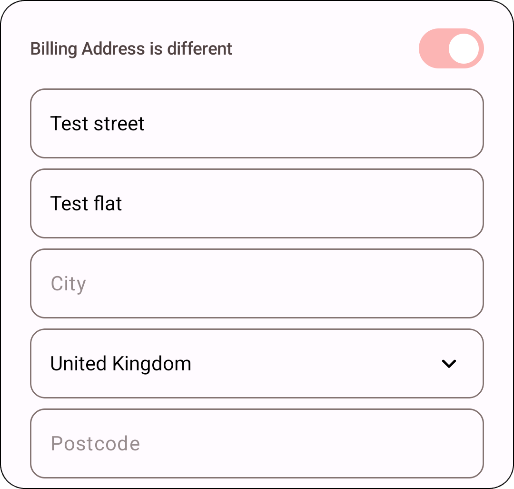
The BillingAddressComponent is a Composable function used to render a billing address form. It provides various parameters to customise the appearance and behaviour of the component.
Parameters
| Parameter | Description |
|---|---|
modifier | The modifier to apply to the layout. |
fontSize | The font size of the text in the component. |
fontWeight | The font weight of the text in the component. |
borderSize | The size of the border around the component. |
borderCornerRadius | The corner radius of the border. |
borderColor | The colour of the border. |
defaultCountryCode | The default country code for the address. |
useDropdown | Whether to use a dropdown for selecting the country. |
showAddressLine2 | Whether to show the second line of the address. |
showAddressLine3 | Whether to show the third line of the address. |
showAddressLine4 | Whether to show the fourth line of the address. |
skipCheckboxUI | Skip the checkbox UI. Adds a checkbox to enable the component’s control of the billing address if it differs from the one in defaultAddress. |
defaultAddress | The default billing address. |
onAddressFilled | A callback function called when the address is filled. |
isOutlined | Whether the component should be outlined. |
This renders a billing address form with the specified customisation options. For uses other than Compose you can use BillingAddressState to define its styling.
Example usage
Compose Multiplatform
Kotlin
BillingAddressComponent(
  modifier = Modifier,
  fontSize = 14.sp,
  fontWeight = ComponentFontWeight.NORMAL,
  borderSize = 1.dp,
  borderCornerRadius = 4.dp,
  borderColor = Color.Gray,
  defaultCountryCode = "GBR",
  useDropdown = false,
  showAddressLine2 = true,
  showAddressLine3 = false,
  showAddressLine4 = false,
  skipCheckboxUI = false,
  defaultAddress = null,
  onAddressFilled = { address ->
      // Handle the filled address
  },
  isOutlined = true,
  lightColorScheme = lightColorScheme(),
  darkColorScheme = lightColorScheme()
)
Android View
XML
<com.accesspaysuite.mobilesdk.ui.billing.BillingAddressView
  android:id="@+id/billingAddressView"
  android:layout_width="match_parent"
  android:layout_height="wrap_content" />
Kotlin
val billingAddressView = findViewById<BillingAddressView>(R.id.billingAddressView)
billingAddressView.init(state = BillingAddressState())
iOS
Create the controller representable
Swift
import SwiftUI
import mobilesdk

struct BillingAddressControllerRepresentable: UIViewControllerRepresentable {
  @Binding var state: BillingAddressState

  init(state: Binding<BillingAddressState>) {
      self._state = state
  }

  func makeUIViewController(context: Context) -> UIViewController {
      return BillingAddressController().make()
  }

  func updateUIViewController(_ uiViewController: UIViewController, context: Context) {
      BillingAddressController().update(state: state)
  }
}
Create the billing address view
Swift
import SwiftUI
import mobilesdk

struct BillingAddress: View {

  @Binding var state: BillingAddressState

  init(state: Binding<BillingAddressState>) {
      self._state = state
  }

  var body: some View {
      BillingAddressControllerRepresentable(
          state: $state
      )
      .ignoresSafeArea(.keyboard)
      .onTapGesture {
          UIApplication.shared.sendAction(#selector(UIResponder.resignFirstResponder), to: nil, from: nil, for: nil)
      }
  }
}
Use the billing address view
Swift
import SwiftUI
import mobilesdk

struct PaymentView: View {

  @State private var state = BillingAddressState()

  var body: some View {
      BillingAddress(
          state: $state
      )
  }
}
The BillingAddress data class
| Property | Description |
|---|---|
line1 | (Required) Line 1 of the customer’s billing address. |
line2 | (Optional) Line 2 of the customer’s billing address. |
line3 | (Optional) Line 3 of the customer’s billing address. |
line4 | (Optional) Line 4 of the customer’s billing address. |
city | (Required) City of the customer’s billing address. |
region | (Required) Region of the customer’s billing address. |
postcode | (Required) Postcode of the customer’s billing address. |
countryCode | (Required) The three-character ISO-3166-1 code for the customer’s billing address country. |
email | (Optional) Email address of the customer. |
Kotlin
/**
* # Billing Address
*
* > The billing address of the Customer. Will be used for AVS checks. We'll save the billing
* > address when the customer makes their first payment.
* > Providing a billing address for subsequent payments will update the address we've saved if
* > you send new, empty or no values for each field.
*
*/
@Parcelize
@Serializable
data class BillingAddress(
  var line1: String? = null,
  var line2: String? = null,
  var line3: String? = null,
  var line4: String? = null,
  var city: String? = null,
  var region: String? = null,
  var postcode: String? = null,
  var countryCode: String? = null,
  var email: String? = null
)