Overview
The PaySuite Payment Page — previously known as Hosted Cashier — is a payment form that we host and you redirect your customers to, so that card details never touch your systems. See Integration options for how it compares with our other products.
How a payment works
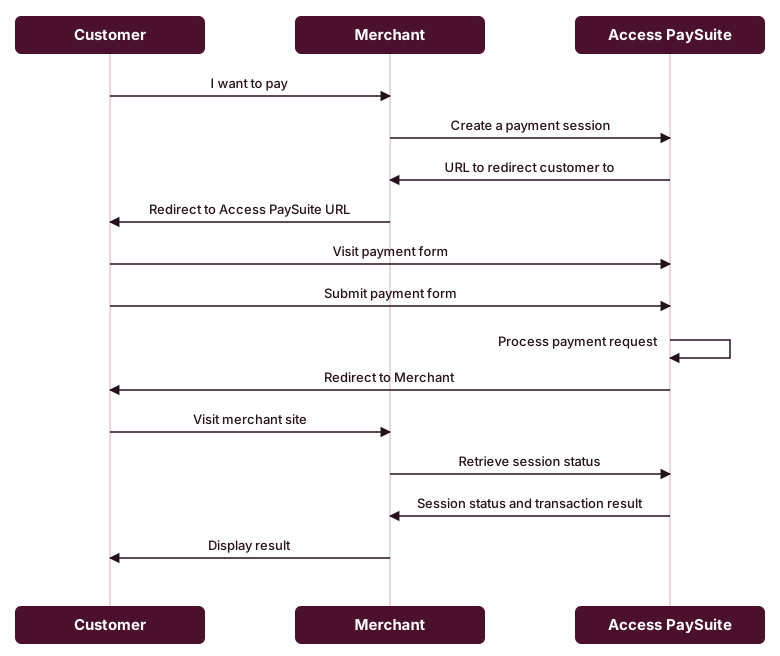
You create a payment session over the API, redirect your customer to the URL we return, and we take them through the payment form and the authorisation. When we are done we send them back to you, and you retrieve the session status to find out what happened.
Returning your customer to your site
You control where we send your customer once they leave the payment page, using the URLs you set on the session object of a hosted session request — see Hosted sessions.
- returnUrl — required. Where we return the customer after we have processed the transaction, whatever the result. Retrieve the session status from this page to get the transaction result rather than relying on anything in the redirect itself.
- cancelUrl — optional. Where we return the customer if they cancel out of the payment page. If you omit it, cancellations go to the returnUrl.
- restoreUrl — only needs to be provided alongside the returnUrl when you present the payment page inside an iframe. See Resuming a session inside an iframe below.
If you do not use an iframe, the returnUrl and — where you want a separate destination — the cancelUrl are all you need.
Resuming a session inside an iframe
Some payment methods take the customer to an external provider to complete or authorise the payment, and those providers cannot be shown inside an iframe, so the customer has to leave it. The restoreUrl is how we put them back:
- The customer chooses a payment method that requires leaving the iframe.
- We build our own internal resume URL and append it to your restoreUrl as the
hfSessionORTURLquery parameter, then send the customer to the external provider using that address as the return destination. - Once the customer finishes with the provider — or cancels to choose another payment method — their browser is returned to
https://www.merchant.example.com/restore?hfSessionORTURL=…. - Your restoreUrl page renders your site as the customer left it, outside of any iframe, including the payment iframe — with the decoded
hfSessionORTURLvalue as the iframe'ssrc.
<iframe src="{hfSessionORTURL}"></iframe>Read the hfSessionORTURL parameter and URL-decode it if your framework does not do so for you. Loading it resumes the hosted session: the customer sees the payment form again if they cancelled, or is taken on to your returnUrl if the payment completed.
Sending a link instead of redirecting
If you would rather send your customer a link than redirect them from your own site, Pay by Link creates a unique, secure URL for a payment or payout that opens a hosted session when the customer visits it. Send it by email, SMS, chat or any other electronic means, either from our UI or over the API, and issue links one at a time or in batches of up to 500. See Pay by Link (EmailPay).
Making the payment page your own
The payment page can be customised to fit your brand by developing a hosted skin, which supplies your own CSS and JavaScript — and optionally your own localised text — to every hosted page. You can also add a header image or a customer notice without writing a skin. See Customising the payment page.
PaySuite Payment Page flow
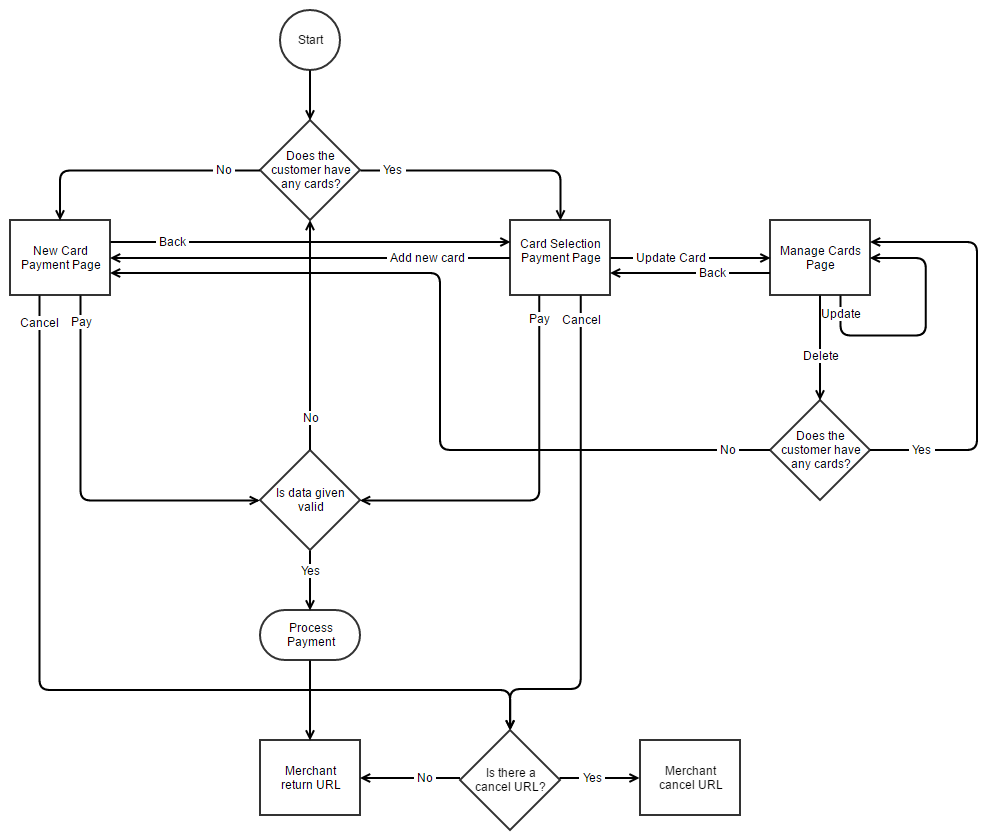
There are 4 pages that make up the PaySuite Payment Page:
- New Card Payment Page this is a payment form for someone to enter their full card details (or choose another payment method) to process a payment.
- Card Selection Payment Page when the customer already has at least one saved card, this form allows them to choose from their saved cards (or choose PayPal) to process a payment. It includes options to add a new card, which takes the user to the New Card Payment Page, and to update already saved cards, which takes the user to the Manage Cards Page.
- Manage Cards Page this allows the user to update the details of their saved cards, though they cannot change the card number itself. They can also delete any saved card.
- Transaction Result Page only shown when requested via the api, or configured on the account, this page shows the user the result of the transaction processing request. It also presents key details of the transaction, including amount, transaction id, merchant reference, etc.