Using the Javascript library
In order to integrate the CardLock library you will need to:
Step 1: Update the form action to submit requests to Access PaySuite’s “safe fallback” page
In order to protect your application from receiving unexpected or unwanted card details in the event that the CardLock library is either misconfigured or not supported (e.g. by users without JavaScript enabled in their browser), the default submission action of the payment form should be updated to the Access PaySuite landing page at:
https://secure.pay360.com/cardlock/fallbackThis is a secure page which explains to the cardholder that their payment could not be processed, reassures them that their card details are safe, and advises them to contact you for assistance.
Using the example above, the form element would be changed to the following:
<form id="paymentForm" method="post" action="https://secure.pay360.com/cardlock/fallback">Step 2: Add a hidden field to pass the CardLock token into your application
A new hidden field needs to be added to the form which will pass the generated CardLock token into the form submission. For example:
<input id="token" type="hidden" name="token" value="" />This field can have any id or name; the id is specified when invoking the JavaScript library, and the name should correspond to one that your application will be expected to receive and process.
Step 3: Include and invoke the JavaScript library to intercept form submission
The CardLock JavaScript library can be loaded from the Access PaySuite domain directly; you don’t need to store a local copy. The library should be loaded from:
https://secure.pay360.com/cardlock/scripts/v2/cardLock.min.jsThere is also a non-minified version of the library which can be found at https://secure.pay360.com/cardlock/scripts/v2/cardLock.js.
The library supports Subresource Integrity (SRI) so it is recommended to use the integrity attribute on the script element so the integrity of the file is verified by the browser. You will also need to specify the crossorigin attribute with a value of anonymous.
For example:
<script type="text/javascript" src="https://secure.pay360.com/cardlock/scripts/v2/cardLock.min.js" integrity="sha384-iGlEZZwwOIVj+ebuO+4pnaWSENfliOd/VszKsVjC7kzvXhY+z5tb3/2llFH92jZF" crossorigin="anonymous"></script>secure.pay360.com) is specified in the script-src directive as well as the connect-src directive as the script will dynamically load configuration from the domain.Available script versions and their integrity checksums:
| Script | Checksum |
|---|---|
/cardlock/scripts/v2/cardLock.min.js | sha384-iGlEZZwwOIVj+ebuO+4pnaWSENfliOd/VszKsVjC7kzvXhY+z5tb3/2llFH92jZF |
/cardlock/scripts/v2/cardLock.js | sha384-3hFfOO3GOcsD6RIRoU1406145rWm3E4/BulsjK76PRFEMiy6Pbf58iLIOsE6/cFk |
The checksums are the same when using the test environment scripts from https://secure.mite.pay360.com/cardlock. Note that a checksum is not available for version 1 of the script, we recommend using version 2 onwards.
Once included onto the page, CardLock is invoked as follows:
<script type="text/javascript">
new CardLock({
	publishableId: '',
	formElementId: '',
	panElementId: '',
	tokenElementId: '',
	merchantAction: ''
});
</script>
The mandatory fields for this call are:
| Name | Description | Notes |
|---|---|---|
publishableId | Publishable identifier | An active CardLock publishable ID. Issued via our Client Management team. |
formElementId | Form element identifier | DOM identifier of the form element to intercept. For example, paymentForm. |
panElementId | Card number element identifier | DOM identifier of the card number field element. For example, cardNumber. |
tokenElementId | Token element identifier | DOM identifier of the token element. For example, token. |
merchantAction | Form submission target | Form submission destination. This should be the original form destination prior to changing to the Access PaySuite fallback page. For example: https://merchant.example.com/process-payment |
You can optionally provide details of:
| Name | Description | Notes |
|---|---|---|
cvvElementId | Card verification code identifier | DOM identifier of the card verification code element. If this is not set, CardLock will not tokenise it and your application can still pass it through to Access PaySuite as described in “Submitting a Payment with a CardLock token”. For example, securityCode. |
errorHandler | Error handler callback | Pointer for a function called when an error occurs during tokenisation. |
preSubmitCallback | Pre-submission callback | Pointer for a function called prior to form submission. |
It is up to you to ensure that the library is invoked after the form is rendered onto the page; either a conventional event listener (e.g. window.onload) can be used, or a JavaScript library (such as jQuery) may be used to hook into this. It is also possible to include the script after the form in the relevant HTML.
<script type="text/javascript" src="https://secure.pay360.com/cardlock/scripts/v2/cardLock.min.js" integrity="sha384-iGlEZZwwOIVj+ebuO+4pnaWSENfliOd/VszKsVjC7kzvXhY+z5tb3/2llFH92jZF" crossorigin="anonymous"></script>

<script type="text/javascript">
new CardLock({
	publishableId: 'phLDye-NTA-TdcUk0jkpfg',
	formElementId: 'paymentForm',
	panElementId: 'cardNumber',
	cvvElementId: 'securityCode',
	tokenElementId: 'token',
	merchantAction: 'https://merchant.example.com/process-payment'
});
</script>
Step 4: Incorporate custom error and pre-submission callbacks
When an error occurs during tokenisation, for example, invalid input or bad credentials were provided, the error is shown in a standard alert dialogue box on our site.
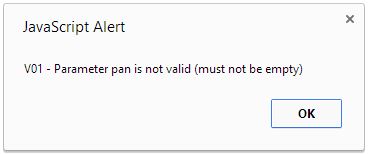
If you would prefer to keep error handling in line with the user experience on your site then you should implement a custom error handler. For example, you may want to use a different alert-style dialog, use custom styling or inject validation messages into the form to reflect missing or invalid values.
To do this you will need to pass a function pointer into the configuration when invoking the CardLock library. For example:
<script type="text/javascript">
var errorHandler = function( response ) {
	alert( "Received a status " + response.status + " response, with message " + response.message );
};

new CardLock({
	publishableId: 'phLDye-NTA-TdcUk0jkpfg',
	formElementId: 'paymentForm',
	panElementId: 'cardNumber',
	cvvElementId: 'securityCode',
	tokenElementId: 'token',
	merchantAction: 'https://merchant.example.com/process-payment',
	errorHandler: errorHandler
});
</script>
The error handler function will receive a single argument, which has the following properties:
| Property | Description |
|---|---|
status | Status (error) code. See Response Codes and Messages — CardLock. |
message | Message describing the error condition and providing further detail |
In addition to the error handler, you can also implement a pre-submission callback. This is called when the form is submitted, but prior to the tokenisation request. This can be used to implement additional client-side validation, for instance.
To do this you will need to pass a function pointer into the configuration when invoking the CardLock library. For example:
<script type="text/javascript">
var preSubmitCallback = function() {
	alert( "Submitting tokenisation request" );
	return true;
};

new CardLock({
	publishableId: 'phLDye-NTA-TdcUk0jkpfg',
	formElementId: 'paymentForm',
	panElementId: 'cardNumber',
	cvvElementId: 'securityCode',
	tokenElementId: 'token',
	merchantAction: 'https://merchant.example.com/process-payment',
	preSubmitCallback: preSubmitCallback
});
</script>
The pre-submission callback can return true to allow tokenisation to continue, and false to prevent the form submission.
CVV handling
Depending on how you operate you can opt to omit the CVV from tokenisation. For example, where you don’t collect CVV at all or where you collect on a separate page to the card number. In this case, when you submit a payment request with the CardLock token you will still need to include the CVV so we can send it to the authoriser to perform the appropriate checks.
If you decide to use CardLock to tokenise the CVV as well as the card number the CVV in the payment request will not be mandated.
Whether you decide to tokenise the CVV or provide it separately is up to you but it must be provided unless your account is configured to not require CVV. Let us know if you want that feature to be enabled.