Network Tokenisation
Introduction
A network token is a stored credential that is provisioned by a card scheme ("card network") on behalf of a merchant. Network tokens are used in place of a regular card number (PAN) during transaction processing and have a lifecycle that varies independently from the underlying card; for instance, they can expire or be suspended/resumed/deleted. In addition, when the underlying PAN changes, the associated network token may be used to keep processing with updated card details - as an alternative to older services like Visa Account Updater (VAU) or Mastercard Automatic Billing Updater (MABU).
We have incorporated network tokens into the existing card storage mechanisms within Advanced Payments, which includes secure long-term storage of the network token values themselves. Merchants/integrators exercise network tokens by using/referencing stored cards within the platform in the same way they do currently - i.e. by using a merchant token in conjunction with a registered customer or making repeat requests against a recurring or instalment series.
Limitations when using network tokens
Once a network token has been provisioned for a stored card, the original underlying PAN is no longer available. All future transactions must be processed using the network token.
- If you ask us to turn off network tokenisation for your account, existing stored cards backed by network tokens will become unusable
- We can no longer return a fingerprint when using a card backed by a network token, and features that use a card fingerprint (e.g. card number in allowlist/blocklist/custom Optimize list, card velocity rules, same-card search) will not work for those transactions
- Following an update to the underlying PAN, we will no longer have access to its BIN - just the last four digits
- Any masked PANs we return are modified accordingly (e.g.
444433******1111→************1111) - We are unable to refresh detailed data derived from the BIN (e.g. country of issue, card usage type and card category) when the card is re-used
- Any masked PANs we return are modified accordingly (e.g.
- If you arrange for an export of card details (to support moving to another PSP), we are unable to include cards backed by a network token
Acquirer support
We currently support using network tokens for Visa and Mastercard processing via Barclays Merchant Services, Lloyds MSIP (Domestic) and Worldpay.
Token provisioning
When network tokenisation is enabled for your account, we automatically provision a network token for eligible transactions - payments, pre-auths, account verifications and repeats where a new card is being saved for re-use, or where an existing saved card doesn't currently have one. Guest transactions and standalone sales that don't save a card will not have a network token provisioned.
For some transactions, e.g. Mastercard ECOM CITs, the network token is provisioned before authorisation, and the token is used to process the transaction - including for 3D Secure, if applicable. Mastercard MITs will not provision a network token. This allows us to meet scheme rules and best practices regarding authentication. For most other transactions (e.g. Visa and MOTO) the network token is provisioned after successful authorisation. The networkToken.usage value in the API response indicates how and when provisioning took place. See Stored Credentials Framework for more information on how we determine storage for future re-use, and how we classify cardholder initiated (CIT) vs. merchant-initiated (MIT) transactions.
Network tokenisation can be enabled on a per-card scheme basis. If your account structure is very large or complex, our Implementations team will discuss further with you, including which parts of your account can be enabled and when.
Opt out of provisioning
For more fine-grained control over when a token is provisioned, or to support a progressive roll-out, you can use the provisionNetworkToken option in the Payments, Hosted and EmailPay APIs.
Here is a sample request for the payments API, using transactionOptions.provisionNetworkToken:
Payment opting out of network token provisioning
POST /acceptor/rest/transactions/{instId}/payment{
"transaction": {
"currency": "GBP",
"amount": "7.99",
"commerceType": "ECOM",
"recurring": true
},
"paymentMethod": {
"card": {
"pan": "9900000000005159",
"expiryDate": "1229",
"cv2": "456",
"cardHolderName": "Jane Doe"
}
},
"transactionOptions": {
"provisionNetworkToken": false
}
}curl -X POST "{targetEnvironmentPath}/acceptor/rest/transactions/{instId}/payment" \
-u "{apiUser}:{apiPassword}" \
-H "Content-Type: application/json" \
-d '{
"transaction": {
"currency": "GBP",
"amount": "7.99",
"commerceType": "ECOM",
"recurring": true
},
"paymentMethod": {
"card": {
"pan": "9900000000005159",
"expiryDate": "1229",
"cv2": "456",
"cardHolderName": "Jane Doe"
}
},
"transactionOptions": {
"provisionNetworkToken": false
}
}'Here is a sample request for Hosted, using features.provisionNetworkToken:
Payment session opting out of network token provisioning
POST /hosted/rest/sessions/{instId}/payments{
"transaction": {
"money": {
"currency": "GBP",
"amount": {
"fixed": "29.95"
}
}
},
"session": {
"skin": 2,
"returnUrl": {
"url": "https://www.example.com"
}
},
"customer": {
"registered": true,
"identity": {
"merchantCustomerId": "JANE_DOE_001"
},
"details": {
"name": "Jane Doe",
"emailAddress": "[email protected]",
"telephone": "+441234567890"
}
},
"features": {
"provisionNetworkToken": false
}
}curl -X POST "{targetEnvironmentPath}/hosted/rest/sessions/{instId}/payments" \
-u "{apiUser}:{apiPassword}" \
-H "Content-Type: application/json" \
-d '{
"transaction": {
"money": {
"currency": "GBP",
"amount": {
"fixed": "29.95"
}
}
},
"session": {
"skin": 2,
"returnUrl": {
"url": "https://www.example.com"
}
},
"customer": {
"registered": true,
"identity": {
"merchantCustomerId": "JANE_DOE_001"
},
"details": {
"name": "Jane Doe",
"emailAddress": "[email protected]",
"telephone": "+441234567890"
}
},
"features": {
"provisionNetworkToken": false
}
}'| Field | Meaning |
|---|---|
| provisionNetworkToken | Set to false to opt out of provisioning a network token. Omit this field or set to true to provision according to your account configuration. |
Use provisionNetworkToken: false to opt out of provisioning a new network token. This may also be used on repeat requests, but needs to be specified on each request - it will not be copied from an original transaction.
This option has no effect if network tokenisation is disabled on your account. It will not prevent use of a network token where one already exists for a saved card.
Provisioning failures
Not all cards can be network tokenised. Token provisioning might fail if the card is unsupported, if the card scheme or issuer rejects it, or if the scheme token service is temporarily unavailable. If this happens, we acknowledge the failure in our API response, but complete the transaction as normal. We will try to provision again when the card is next used.
Token usage
Token cryptogram
A cryptogram is a single-use cryptographic authentication value required to process customer-initiated transactions (CIT) using a network token. We automatically attempt to obtain the required token cryptogram when necessary. If not available, the transaction will fail with response code A153 - Token cryptogram is not available.
CSC handling
A Card Security Code (CSC, variously known as CVV2/CVC2/CV2/CID/etc.) is not used to authorise a customer initiated transaction (CIT) using a network token - the cryptogram is used instead. However, our validation requirements for CSC on transactions have not changed.
You will need to provide the CSC when submitting requests via the payments API, unless you have asked us to configure your installation not to require one. Likewise, when using Hosted payment pages, customers will need to provide it unless otherwise configured. Installations can be configured flexibly, e.g. to require a CSC for Hosted transactions, but allow API processing without one - please ask our Implementations team about this.
Since the CSC is not used in authorisation, no CSC check result can be returned by the card issuer. If you have asked us to configure your installation to enforce a particular check outcome - or applied one using self-service risk controls - then be aware that this outcome will not be enforced when processing with a network token, and transactions will not be cancelled due to lack of a CSC result.
Token updates
From time to time, a network token may receive updates:
- the token's status and/or expiration date can change to reflect lifecycle events at the card issuer
- the underlying card details (PAN, expiration date) may be updated if the card is re-issued
When this happens, we will process the update and apply it to the existing stored card. These details will be reflected when you list the customer's payment methods, or request details of the individual payment method - see Manage Customers. If the card details themselves have changed, they will be visible to the cardholder in any Hosted session for that registered customer - see Changes to Hosted payment pages.
Following an update, future transactions using the stored card will use the updated network token, which in turn will use the latest details associated with it. For instance, if a card with a stored network token approaches its expiration date and is re-issued, then the updated card details will automatically be used for future transactions referencing that stored card.
To process a transaction against an updated network token, you reference the stored card in the same manner as you normally would, e.g.:
- create a Hosted session using the registered customer identity (the customer opts whether to use the saved card)
- provide the original merchant token to process a card-on-file payment via the API
- provide the original transaction identifier when submitting a repeat for subsequent recurring/instalment transactions via the API
Suspended, expired and deleted tokens
The card issuer may update the status of a network token, usually in response to a real-world event or request from the cardholder. For example, a card that has been misplaced may have associated network tokens suspended, and then subsequently re-activated if the card is discovered. Many issuers permit cardholders to temporarily "freeze" a card via a mobile app/Online Banking/etc. and this may trigger suspend/resume events.
Conversely, a card that is confirmed lost or stolen may have network tokens deleted to prevent future use. Issuers may also delete tokens to prevent their continued use for continuous authority or other merchant-initiated transactions (MIT) - in addition to/instead of returning a "recurring stop" instruction on authorisation.
Attempting to process a transaction using a network token that is suspended, expired or deleted will fail with a A152 - Network token is {STATUS} response:
Payment failed because the network token is suspended
POST /acceptor/rest/transactions/{instId}/payment{
"transaction": {
"currency": "GBP",
"amount": "10.00",
"commerceType": "ECOM"
},
"paymentMethod": {
"cardToken": {
"token": "MT_Qd3kV8pLRsyN0bT2uXcW1A",
"cv2": "123"
}
},
"customer": {
"merchantRef": "JANE_DOE_004"
}
}curl -X POST "{targetEnvironmentPath}/acceptor/rest/transactions/{instId}/payment" \
-u "{apiUser}:{apiPassword}" \
-H "Content-Type: application/json" \
-d '{
"transaction": {
"currency": "GBP",
"amount": "10.00",
"commerceType": "ECOM"
},
"paymentMethod": {
"cardToken": {
"token": "MT_Qd3kV8pLRsyN0bT2uXcW1A",
"cv2": "123"
}
},
"customer": {
"merchantRef": "JANE_DOE_004"
}
}'HTTP/1.1 207 Multi-Status
{
"paymentMethod": {
"card": {
"cardType": "VISA_DEBIT",
"cardUsageType": "DEBIT",
"cardScheme": "VISA",
"maskedPan": "990200******5132",
"expiryDate": "0327",
"networkToken": {
"status": "SUSPENDED",
"expiryDate": "0427"
}
}
},
"transaction": {
"status": "FAILED"
},
"outcome": {
"status": "FAILED",
"reasonCode": "A152",
"reasonMessage": "Network token is SUSPENDED"
},
"trace": "TDmrgyNF1QttEoGkxY-i4DQ",
"link": []
}- If the token is
SUSPENDED/EXPIRED, you should advise the cardholder that the stored card is temporarily unusable. For customer-initiated transactions (CIT) you may invite them to try another card or payment method, if available. For merchant-initiated transactions (MIT) then you may wish to try again later - subject to any terms they previously agreed allowing for re-tries. - If the token is
DELETED, you will need to obtain fresh details from the cardholder and - if processing MITs - set up a new UCOF/recurring/instalment series, as you would after receiving multiple declines and/or a "recurring stop" instruction.
Hosted payment pages will hide saved cards backed by a network token if that token is marked as suspended or deleted when the session is created.
Changes to Hosted payment pages
In most cases, Hosted will support saved cards backed by a network token without any modifications. However, there are some functional changes to be aware of, and some tweaks that might affect certain custom skins. Integrators are strongly advised to test in MITE. Note that only version two skins are supported.
-
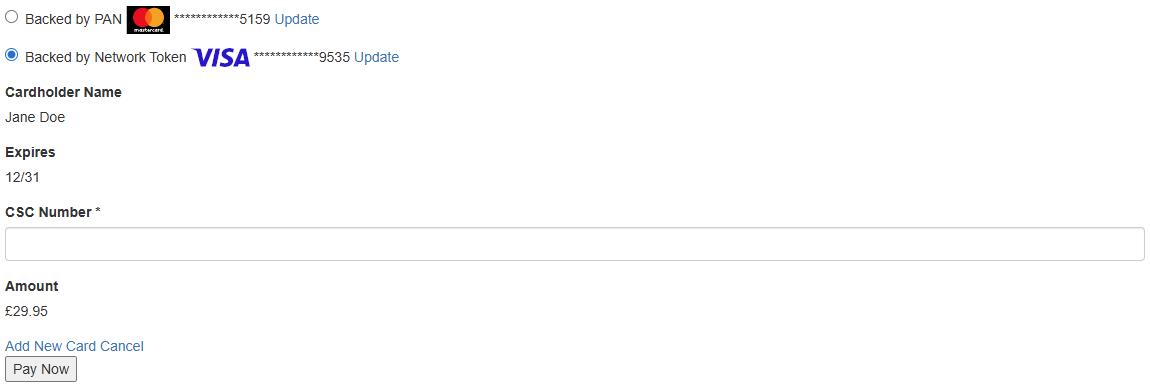
In order to keep a consistent experience for cardholders, if any of their saved cards are backed by a network token, then the masked PAN for all is shown using the last four digits only, e.g.:
Saved cards shown with the last four digits only -
The JavaScript model of available cards reflects the masked PAN change above and now includes a field indicating whether a given card is backed by a network token, e.g.:
JavaScriptHosted.Cashier.cardList = { "availableCards": { "0": { "maskedPan": "***********5159", "cardNickname": "Backed by PAN", "networkTokenPresent": false, // ... }, "1": { "maskedPan": "************9535", "cardNickname": "Backed by Network Token", "networkTokenPresent": true, // ... } } }; -
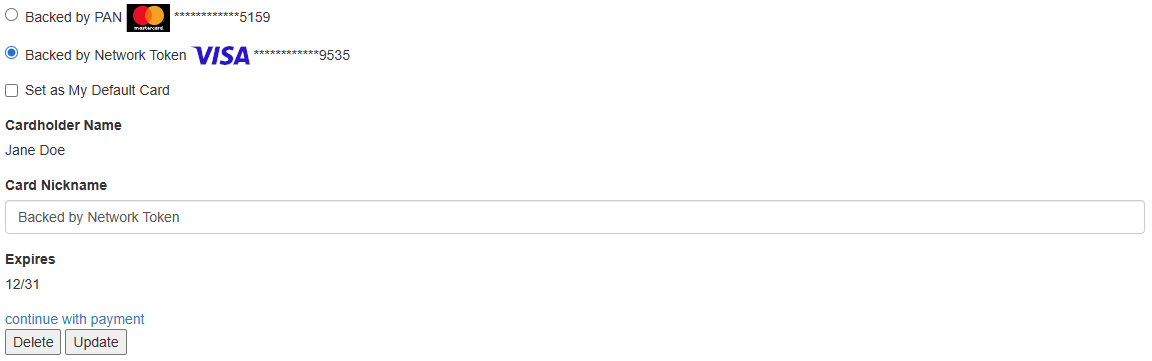
It is not possible to submit or update the expiration date, start date ("valid from") or issue number for a card backed by a network token. This information is maintained through updates from the scheme token services.
For these entries, the start date and issue number fields are removed. The expiration date will be displayed as a static value, as shown in the first screenshot above. This also applies when editing the saved card, either during a transaction session or in a card management flow:
Editing a saved card backed by a network token
API response changes
Transaction processing responses, callback and notification requests and "retrieve transaction" responses will now include additional elements when the payment method is a card backed by a network token.
API examples
Network token provisioned when storing a new card
POST /acceptor/rest/transactions/{instId}/payment{
"transaction": {
"currency": "GBP",
"amount": "15.00",
"commerceType": "ECOM"
},
"paymentMethod": {
"card": {
"pan": "9802000026219536",
"expiryDate": "1229",
"cv2": "234",
"cardHolderName": "John Smith"
}
},
"customer": {
"merchantRef": "JOHN_SMITH_002",
"displayName": "John Smith"
}
}curl -X POST "{targetEnvironmentPath}/acceptor/rest/transactions/{instId}/payment" \
-u "{apiUser}:{apiPassword}" \
-H "Content-Type: application/json" \
-d '{
"transaction": {
"currency": "GBP",
"amount": "15.00",
"commerceType": "ECOM"
},
"paymentMethod": {
"card": {
"pan": "9802000026219536",
"expiryDate": "1229",
"cv2": "234",
"cardHolderName": "John Smith"
}
},
"customer": {
"merchantRef": "JOHN_SMITH_002",
"displayName": "John Smith"
}
}'HTTP/1.1 201 Created
{
"processing": {
"model": "MANAGE",
"authResponse": {
"statusCode": "00",
"acquirerName": "Barclays Merchant Services",
"message": "AUTH CODE:972862",
"authCode": "972862",
"gatewayReference": "f4ecad065c8ee86298f1aa5a381602ba",
"gatewayMessage": "AUTH CODE:972862",
"avsAddressCheck": "NOT_CHECKED",
"avsPostcodeCheck": "NOT_CHECKED",
"cv2Check": "MATCHED",
"status": "AUTHORISED"
},
"route": "CPE"
},
"paymentMethod": {
"registered": true,
"card": {
"cardToken": "MT_HKJ7WDnpRtWRUkiXT6paFg",
"cardFingerprint": "Q1MtYTZkZjJkZjAtNGZiZi00YTQ1LWJmMDMtZDlmYWRiNzRiZGMw",
"new": true,
"cardType": "VISA_DEBIT",
"cardUsageType": "DEBIT",
"cardScheme": "VISA",
"cardCategory": "DEBIT",
"maskedPan": "980200******9536",
"expiryDate": "1229",
"issuer": "PAY360 TESTING",
"issuerCountry": "ZZZ",
"cardHolderName": "John Smith",
"networkToken": {
"status": "ACTIVE",
"usage": "PROVISIONED",
"expiryDate": "0130"
}
},
"billingAddress": {},
"paymentClass": "CARD",
"reuse": {
"storage": "NEW",
"agreement": "ADHOC",
"receivedSchemeReference": "1G73RDVQJQNNZS"
}
}
}- The network token has been provisioned (networkToken.usage is
PROVISIONED) and it will be used to process future transactions made with the merchant token.
Network token used when processing a card-on-file CIT
POST /acceptor/rest/transactions/{instId}/payment{
"transaction": {
"currency": "GBP",
"amount": "10.00",
"commerceType": "ECOM"
},
"paymentMethod": {
"cardToken": {
"token": "MT_HKJ7WDnpRtWRUkiXT6paFg",
"cv2": "234"
}
},
"customer": {
"merchantRef": "JOHN_SMITH_002"
}
}curl -X POST "{targetEnvironmentPath}/acceptor/rest/transactions/{instId}/payment" \
-u "{apiUser}:{apiPassword}" \
-H "Content-Type: application/json" \
-d '{
"transaction": {
"currency": "GBP",
"amount": "10.00",
"commerceType": "ECOM"
},
"paymentMethod": {
"cardToken": {
"token": "MT_HKJ7WDnpRtWRUkiXT6paFg",
"cv2": "234"
}
},
"customer": {
"merchantRef": "JOHN_SMITH_002"
}
}'HTTP/1.1 201 Created
{
"processing": {
"model": "MANAGE",
"authResponse": {
"statusCode": "00",
"acquirerName": "Barclays Merchant Services",
"message": "AUTH CODE:660559",
"authCode": "660559",
"gatewayReference": "470554fd8088c1b9ad6d70d3f5055411",
"gatewayMessage": "AUTH CODE:660559",
"avsAddressCheck": "NOT_CHECKED",
"avsPostcodeCheck": "NOT_CHECKED",
"status": "AUTHORISED"
},
"route": "CPE"
},
"paymentMethod": {
"registered": true,
"card": {
"cardToken": "MT_HKJ7WDnpRtWRUkiXT6paFg",
"new": false,
"cardType": "VISA_DEBIT",
"cardUsageType": "DEBIT",
"cardScheme": "VISA",
"maskedPan": "980200******9536",
"expiryDate": "1229",
"issuer": "PAY360 TESTING",
"issuerCountry": "ZZZ",
"cardHolderName": "John Smith",
"networkToken": {
"status": "ACTIVE",
"usage": "USED",
"expiryDate": "0130"
}
},
"billingAddress": {},
"paymentClass": "CARD",
"reuse": {
"storage": "EXISTING",
"agreement": "ADHOC",
"originalSchemeReference": "1G73RDVQJQNNZS",
"receivedSchemeReference": "HGNRZ4GX9NKT3N"
}
}
}- The network token was used for authorisation (networkToken.usage is
USED).
Network token provisioning declined
POST /acceptor/rest/transactions/{instId}/payment{
"transaction": {
"currency": "GBP",
"amount": "15.00",
"commerceType": "ECOM"
},
"paymentMethod": {
"card": {
"pan": "9802010026219535",
"expiryDate": "1230",
"cv2": "567",
"cardHolderName": "John Doe"
}
},
"customer": {
"merchantRef": "JOHN_DOE_003",
"displayName": "John Doe"
}
}curl -X POST "{targetEnvironmentPath}/acceptor/rest/transactions/{instId}/payment" \
-u "{apiUser}:{apiPassword}" \
-H "Content-Type: application/json" \
-d '{
"transaction": {
"currency": "GBP",
"amount": "15.00",
"commerceType": "ECOM"
},
"paymentMethod": {
"card": {
"pan": "9802010026219535",
"expiryDate": "1230",
"cv2": "567",
"cardHolderName": "John Doe"
}
},
"customer": {
"merchantRef": "JOHN_DOE_003",
"displayName": "John Doe"
}
}'HTTP/1.1 201 Created
{
"processing": {
"model": "MANAGE",
"authResponse": {
"statusCode": "00",
"acquirerName": "Barclays Merchant Services",
"message": "AUTH CODE:434666",
"authCode": "434666",
"gatewayReference": "f3e7241eca3a9775843c0ed85b2ea3a0",
"gatewayMessage": "AUTH CODE:434666",
"avsAddressCheck": "NOT_CHECKED",
"avsPostcodeCheck": "NOT_CHECKED",
"cv2Check": "MATCHED",
"status": "AUTHORISED"
},
"route": "CPE"
},
"paymentMethod": {
"registered": true,
"card": {
"cardToken": "MT_wKptwKWLSTC_BPSsB6HXQA",
"cardFingerprint": "Q1MtZWMyYjFkZjQtZjI2Yy00ODkzLTg3OWMtZGM0ZGE5ODVmOTNh",
"new": true,
"cardType": "VISA_DEBIT",
"cardUsageType": "DEBIT",
"cardScheme": "VISA",
"cardCategory": "DEBIT",
"maskedPan": "980201******9535",
"expiryDate": "1230",
"issuer": "PAY360 TESTING",
"issuerCountry": "ZZZ",
"cardHolderName": "John Doe",
"networkToken": {
"status": "UNPROVISIONED",
"usage": "PROVISION_FAILED",
"tokenError": "DECLINED"
}
},
"billingAddress": {},
"paymentClass": "CARD",
"reuse": {
"storage": "NEW",
"agreement": "ADHOC",
"receivedSchemeReference": "JJCUQMV92OVYAN"
}
}
}- The payment is authorised and the card is saved as normal; only the network token could not be provisioned. We will try to provision one again the next time the card is used.
New response elements
paymentMethod.card.networkToken is only present if a network token was provisioned or used during this transaction, or if provisioning was attempted and failed - in that case usage is PROVISION_FAILED and tokenError gives the reason. The full definition is in the Cards API reference.
"paymentMethod": {
    "card": {
        // ...
        "networkToken": {
            // Status of the token at the time of this transaction:
            //   ACTIVE        - active and usable
            //   SUSPENDED     - temporarily suspended, may be reactivated
            //   DELETED       - permanently deleted, cardholder re-engagement required
            //   EXPIRED       - expired, should be refreshed
            //   UNPROVISIONED - no token exists
            "status": "ACTIVE",

            // What happened to the token during this transaction:
            //   PROVISIONED          - the network token was provisioned after authorisation
            //   PROVISIONED_AND_USED - the network token was provisioned and used for authorisation
            //   USED                 - an existing network token was used for authorisation
            //   PROVISION_FAILED     - provisioning was attempted but failed
            "usage": "PROVISIONED",

            // Token expiry date, formatted as MMYY
            "expiryDate": "0130",

            // Reason for provisioning failure (present when provisioning failed):
            //   CARD_TOKENISATION_NOT_ALLOWED - card not supported (or not currently eligible)
            //   DECLINED                      - card scheme or issuer refused to provision a token
            //   SERVICE_UNAVAILABLE           - scheme token service unavailable
            //   SYSTEM_ERROR                  - unspecified error during provisioning
            "tokenError": "DECLINED"
        }
    }
}
New response codes
| Response Code | Message(s) |
|---|---|
| A150 | Network tokenisation is disabled |
| A151 | The selected route does not support network tokens |
| A152 | Network token is EXPIRED Network token is SUSPENDED Network token is DELETED |
| A153 | Token cryptogram is not available |
| V216 | Card details update is not allowed for card backed by network token. |
All response codes are listed in Response Codes and Messages.
Testing in MITE
Contact our Support and/or Implementations team to enable network tokenisation on your account in MITE.
Test cards
Existing test cards marked for successful authorisation will allow provisioning of a network token that can be re-used normally.
Provisioning and basic usage
To test specific network token provisioning and basic re-use scenarios, use the following test PANs:
| Scenario | Debit Mastercard | Mastercard (Credit) | Visa Debit | Visa (Credit) |
|---|---|---|---|---|
| Successful tokenisation and re-use | 9800000026219538 | 9801000026219537 | 9802000026219536 | 9803000026219535 |
| Declined tokenisation | 9800010026219537 | 9801010026219536 | 9802010026219535 | 9803010026219534 |
| Other error during tokenisation | 9800020026219536 | 9801020026219535 | 9802020026219534 | 9803020026219533 |
| Successful tokenisation; unable to generate cryptogram | 9800030026219535 | 9801030026219534 | 9802030026219533 | 9803030026219532 |
Card and network token updates
For testing network token updates, including updates to the underlying card details, as well as some token status changes, use the following test PANs:
| Scenario | Debit Mastercard | Mastercard (Credit) | Visa Debit | Visa (Credit) |
|---|---|---|---|---|
| Update card details (new card digits, card and token expiration) | 9800100026219536 | 9801100026219535 | 9802100026219534 | 9803100026219533 |
| Update token status to suspended (token will become unusable) | 9800120026219534 | 9801120026219533 | 9802120026219532 | 9803120026219531 |
| Update token status to deleted (token will become unusable) | 9800130026219533 | 9801130026219532 | 9802130026219531 | 9803130026219530 |
When used, these PANs will provision successfully and the resulting network token can be re-used normally. After a short interval, they will automatically update as described and future attempts to use the corresponding stored card/merchant token will reflect the change.
The update is only applied once and is not reversed. To test again, you can use the same PAN to store a new card for the same or another registered customer, or to create a recurring series.
Updates should generally be applied between 15-20 minutes after the token is provisioned. This is a best-effort service, and we may vary these times in future.